
In the app and in Telegram · free without signing in
The agent in chat: say it in words — it gets done
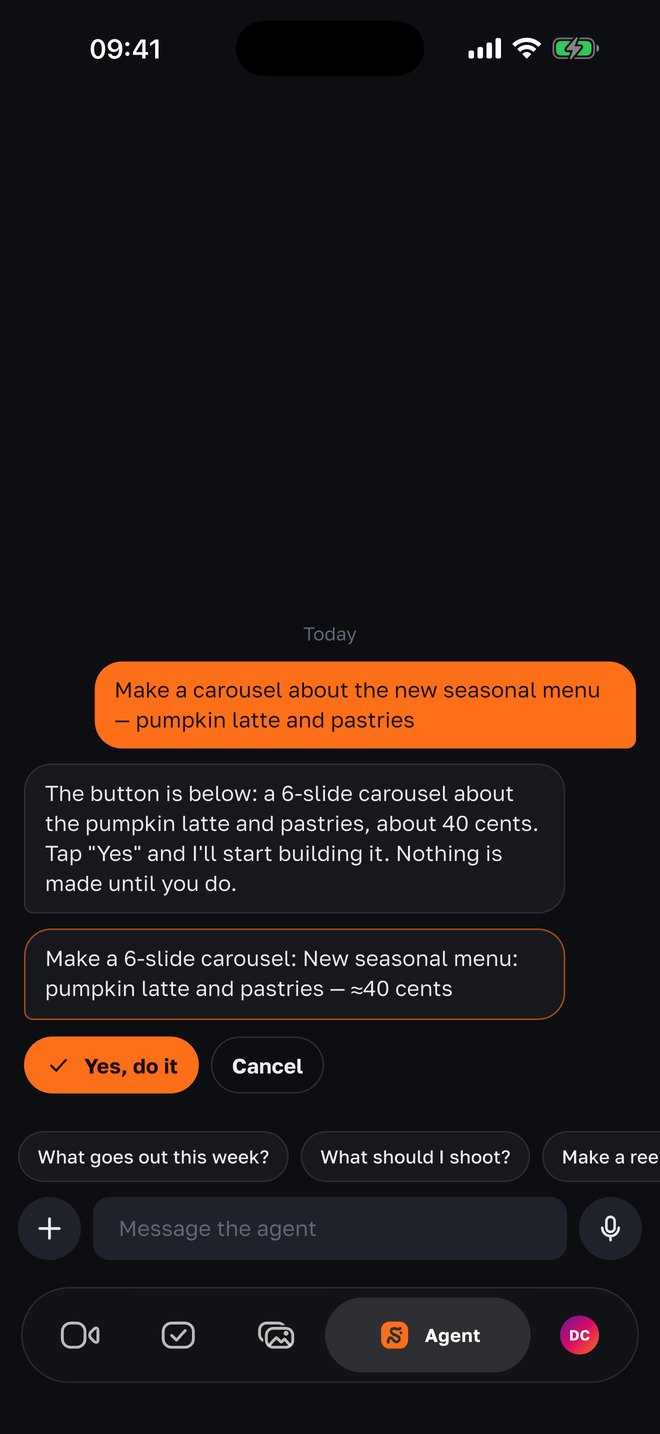
No need to hunt for a button. “Make a carousel about the new menu”, “move the reel to Thursday”, “what goes out this week?” — the agent understands speech, shows what it is about to do and waits for your “Yes”. It is the same agent in the app and in the Telegram bot: one memory, one set of tasks.
- agent actions — all of them product functions: the week, posts, shoots, approval, the goal, the brief
- 27
- agent actions — all of them product functions: the week, posts, shoots, approval, the goal, the brief
- anything paid or irreversible — only by your button; an action waits a day
- “Yes, do it”
- anything paid or irreversible — only by your button; an action waits a day
- remembers the conversation (the last 12 turns) — shared memory with the Telegram bot
- 48 h
- remembers the conversation (the last 12 turns) — shared memory with the Telegram bot
- without signing in: video ideas and teleprompter text for free
- 15 / day
- without signing in: video ideas and teleprompter text for free
How it works
01
Ask in words
Write as you would to a person — or dictate: the microphone is next to the field, the phone does the recognition. Above the field — quick questions: “What goes out this week?”, “What should I shoot?”, “Move a post to another day”, “How are the leads this week?”. The agent answers in the language you wrote in.
02
Check — and tap “Yes, do it”
Show the week, move a day, save a note, give the approval link — the agent does it right away. Build a Reel or a carousel, approve, reject, unschedule, cancel a shoot task — only after your button: it writes exactly what it will do and what it will cost. The button lives for a day and won’t fire twice.
03
Posts as cards, options as buttons
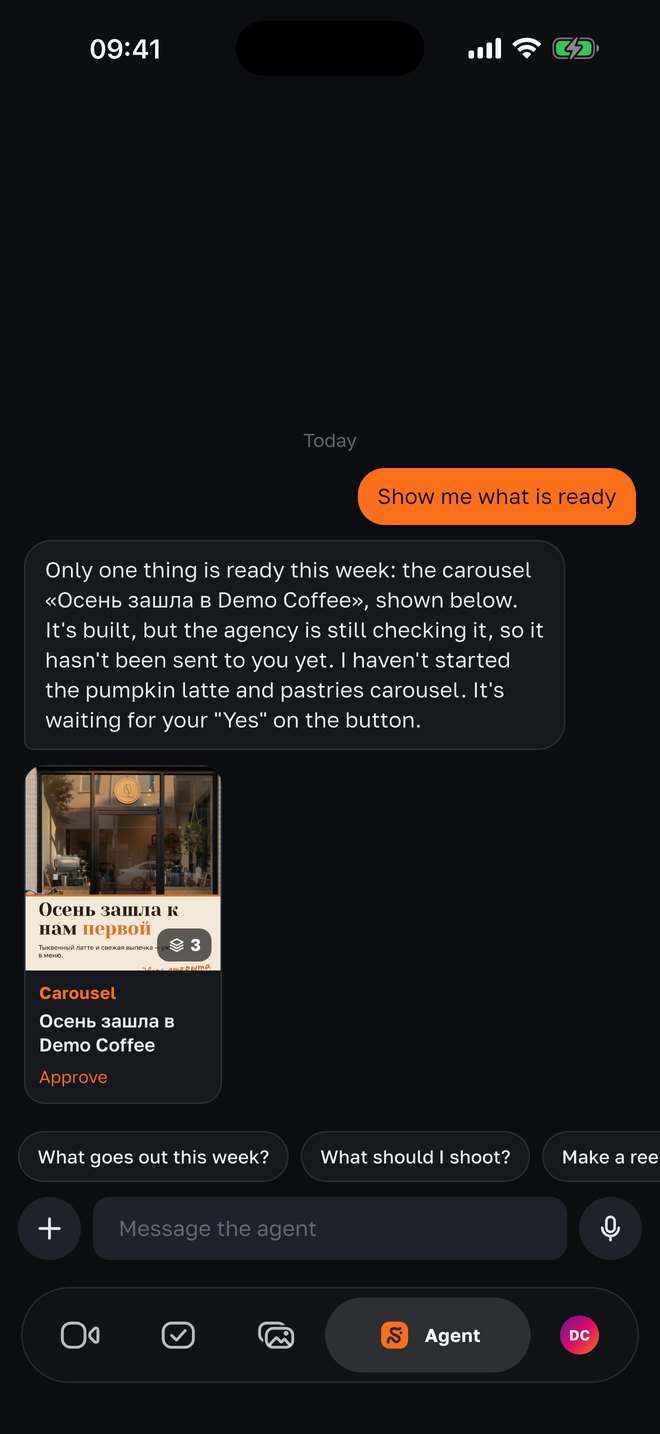
“Show me what’s ready” — post cards under the reply: cover, journey status (building, approve, scheduled, published), publish time; a tap opens the post. When there is a choice, the agent offers options as buttons: “Thursday / Friday”. Attach your photos from “Assets” or the phone and say “make a post out of this”.
04
Without signing in — a filming assistant
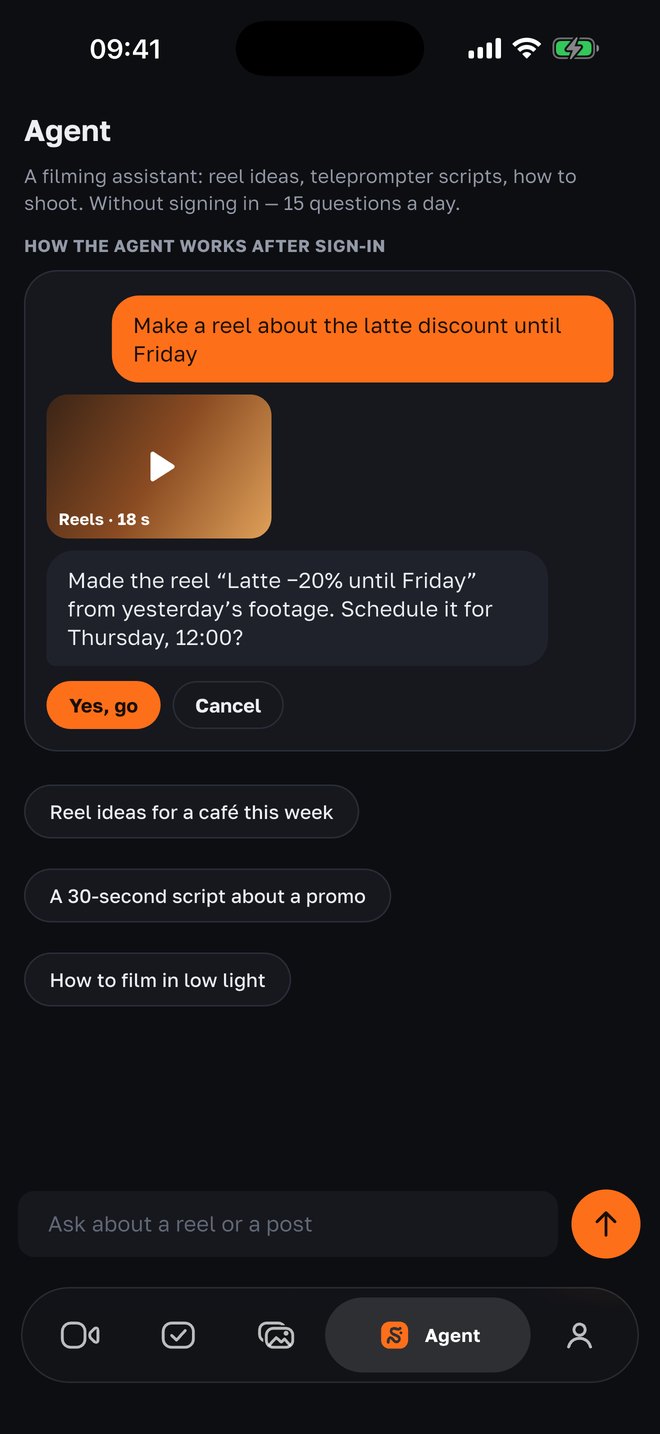
Until there is a project, the agent works as a filming assistant: video and post ideas for your niche, teleprompter text for 15–90 seconds with one “Open in camera” button, tips on how to film. Free, 15 messages a day. Posts, reports and editing — after signing in to an agency project.
Why it is built this way
The agent is a remote control, not another interface
Every agent action is an existing product function: the same editing, the same schedule, the same approval the agency has in the panel. It never invents anything beyond what the system can do.
Money and the irreversible — only by button
A build costs credits, a deletion can’t be undone. So the agent first says what it will do and at what price, and waits for “Yes, do it”. “Fine, go ahead” in text works too.
It doesn’t say “done” when it isn’t
A rule in the prompt: if nothing was executed in this reply — say so. Moved 38 overdue tasks — it writes the number; couldn’t — it explains why.
It sees the video, not just the caption
Ask “why does a word repeat in the video” — the agent reads the voice-over, captions and on-screen text second by second and can look at the frames. It rewrites the caption for free.
It writes first when there is a reason
The week’s focus after the plan, a reminder on the shooting day, one suggestion for your goal after the Sunday report — with a “Yes” button. Only during the project’s working hours, each reason once.
One memory with Telegram
Started in the bot — continued in the app. Two weeks of history, actions waiting for a button, cards — all one.
The same agent — in Telegram
The owner doesn’t have to install the app
The @SMMCopilotbot bot does the same: takes photos and videos, answers a question about the week, builds a video by button, sends the weekly plan, “shoot this” tasks, the approval batch and the Sunday report. The app adds the camera with the teleprompter, files up to 200 MB, the assets gallery and cards — but the agent is one.
- Approval in chat
- The batch of posts arrives as a link; in the app — as a feed with “OK / Changes / Reject”. Changes in words go straight to a re-edit.
- Shoot tasks
- “Shoot this”: what, by which day, for which post. Footage for a task goes to editing by itself; “cancel task 3” — the agent replaces the post with what is available.
- Questions before a video
- Before a video on a topic the agent asks 2–3 questions — your answer in text or a voice message goes into the script as “the owner’s words”.
- In the owner’s language
- English, Russian, Uzbek — by the Telegram or app language; the `/lang` command switches it.
Questions
- Is it free?
- Without signing in — yes: 15 messages a day, ideas and teleprompter text. In an agency project the conversation is paid from the project’s credits (a few cents per reply); builds of videos and carousels — at their price, and only after your “Yes, do it”.
- What can the agent do by itself, without a button?
- Read the week, a post, the results and the brief; move a day; save a note; give the approval link; rewrite a caption; answer the questions before a video; postpone shoot tasks. Anything paid or irreversible — only by button.
- Does it understand voice?
- Yes — in the app you can dictate a message (English and Russian are recognized by the phone). In Telegram a voice message is understood too: the transcript goes to the agent as text.
- Can I attach files?
- Yes: from the project’s “Assets” or from the phone. Say what to do — “make a carousel out of this” — and the agent offers a build by the rules: a post from one photo, a carousel from 2–10, a Reel from videos.
- Does it remember what we talked about?
- The last 12 turns within 48 hours, plus a log of what was done; the history in the app covers 14 days. The memory is shared with the Telegram bot.
- Can the agent publish without me?
- Not if the project is in “Approval” mode. In “Proven — automatically” and “Full autopilot” posts go out by the project’s rules — the agency sets that up with you, and the agent still writes what will go out and when.
- Is there an Android version?
- The app — iPhone only for now. The Telegram bot works everywhere.
Nearby in the app
Tell the agent what to do
Without signing in — a filming assistant for free. With an agency — an employee who builds, gets approval and publishes.