
With an agency · Telegram and the app
Approval in one tap: OK, Changes or Reject
Once a week the agency sends a batch: Reels, posts, carousels — already built. The owner looks at each one and taps “OK”, writes changes in words or rejects. Changes go to a re-edit right away, approved posts land on the schedule by themselves. No more “check the chat, I sent it”.
- the week’s batch goes to the owner by itself; reminders Fri and Sat morning, two at most
- Thu 18:00
- the week’s batch goes to the owner by itself; reminders Fri and Sat morning, two at most
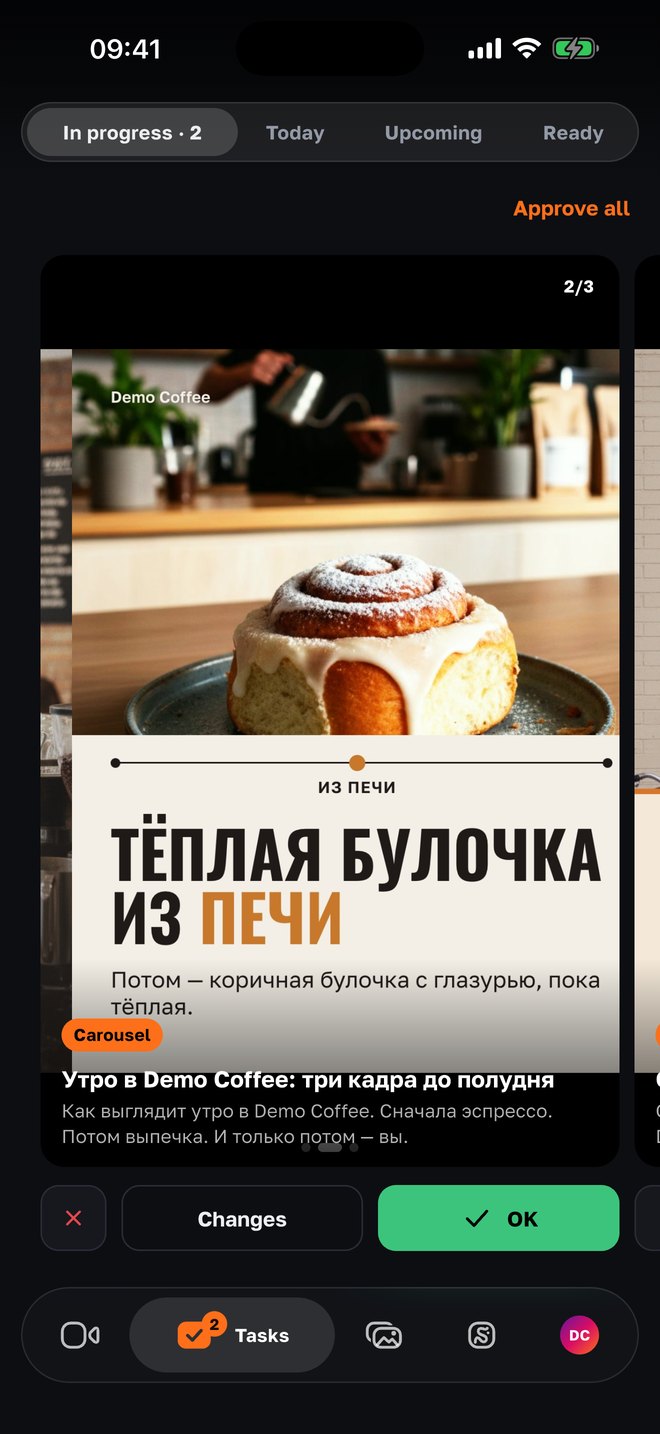
- decisions: “OK”, “Changes” in words, “Reject” — per post, or “Approve all”
- 3
- decisions: “OK”, “Changes” in words, “Reject” — per post, or “Approve all”
- changes longer than three characters start a re-edit; the redone post returns to the batch
- Instantly
- changes longer than three characters start a re-edit; the redone post returns to the batch
- the approval link lives; what is undecided waits instead of going out
- 7 days
- the approval link lives; what is undecided waits instead of going out
How it works
01
The batch arrives — review one by one
On Thursday evening (project time) the week’s built posts go to the owner: in Telegram — as a link with the titles, in the app — in the “Tasks” tab → “Awaiting decision”. A Reel plays on tap, a carousel swipes. Three buttons under each. Many equally good ones — “Approve all”.
02
Without the app — from the Telegram link
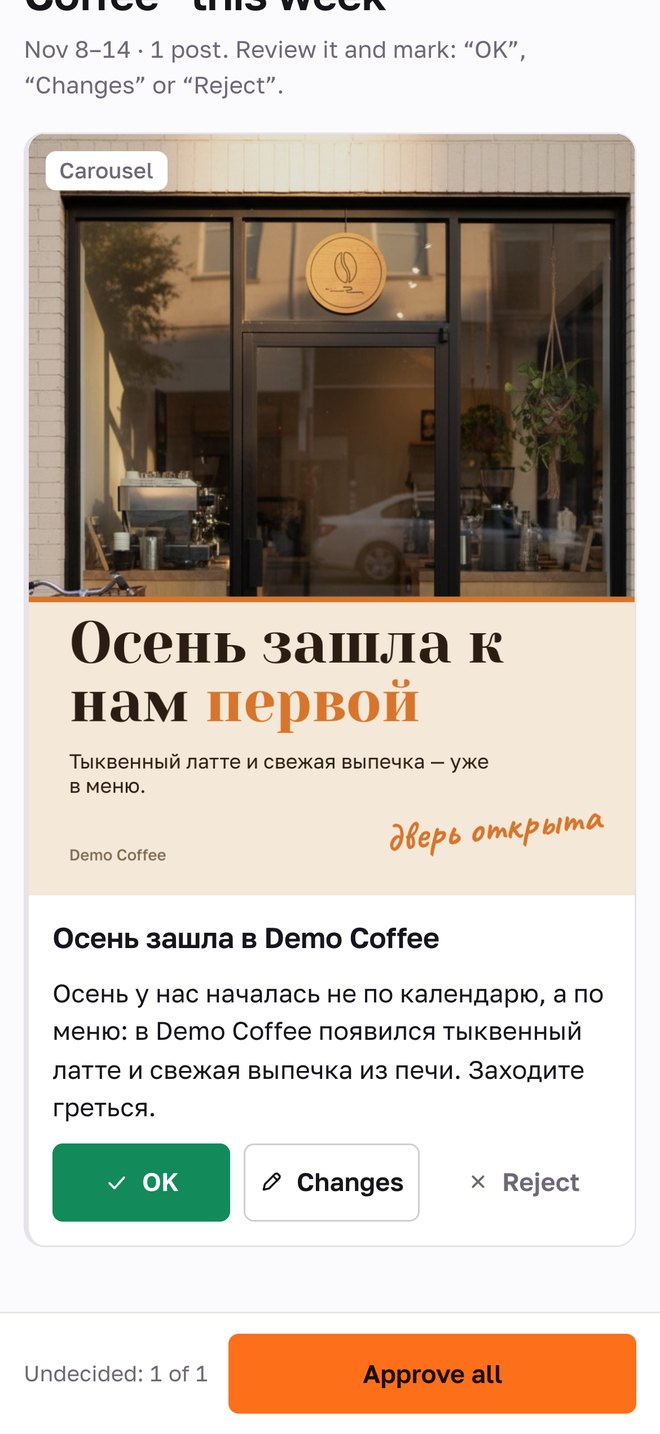
The link opens without signing in on any phone: a preview, the caption in the project’s languages, the same three buttons. The link is private by design — a stranger can’t open it, and it expires in 7 days. A decision made via the link or in the app is the same decision.
03
“Changes” — in words, re-edit — right away
Tap “Changes” — write what’s wrong: “shorter and without the hook”, “bigger price”, “drop the second slide”. The comment goes into the re-edit as a hint, and the redone post returns to the batch undecided — with a message “Redid “…”, have a look”. An accepted “OK” can’t be changed — only through changes.
04
Approved — goes out on schedule, the file is yours
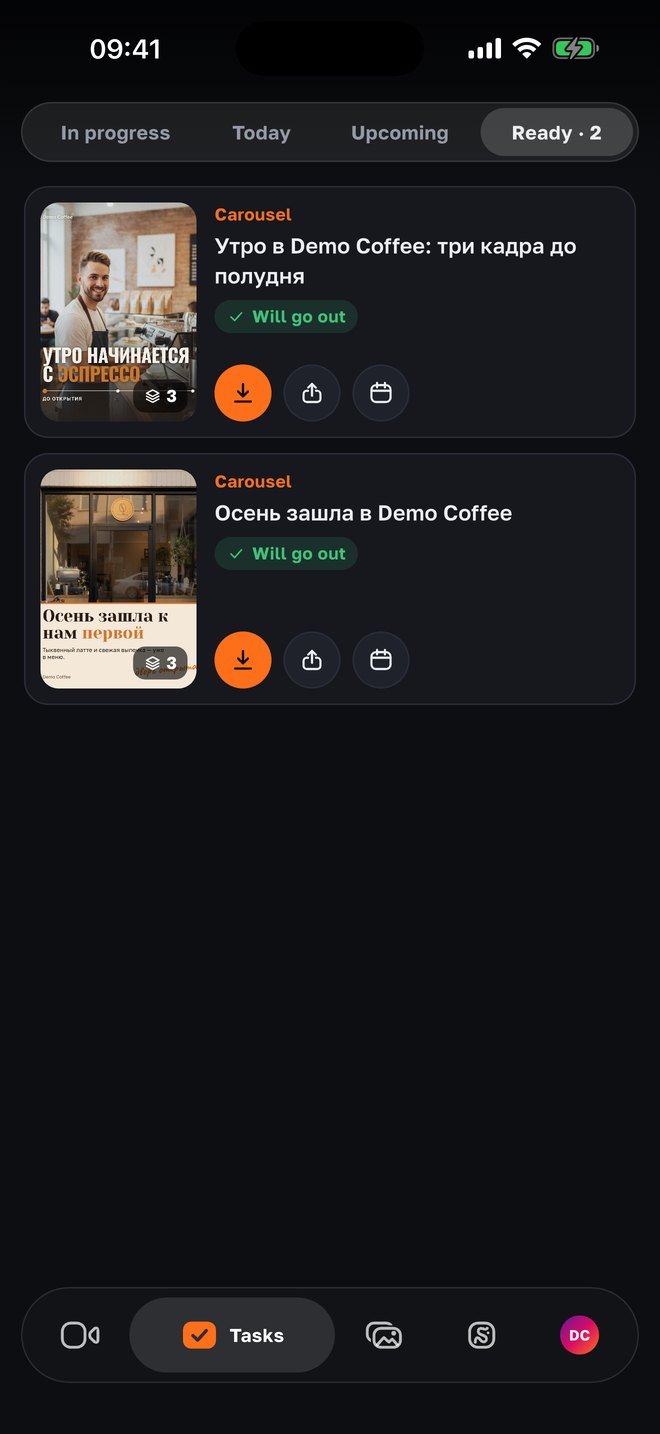
An approved post lands on the schedule: the plan’s day and the project’s usual publishing hour, or the peak hour if Instagram says when your followers are online. “Ready” holds everything approved, scheduled and published: download the video or slides to the phone, share, open the post on Instagram or Telegram, move the time.
Why it is built this way
A batch, not one by one in a messenger
Seven posts in seven messages are seven “I’ll look later”. One batch a week — one action at a convenient minute, and the week is approved.
Three buttons instead of a thread
“OK / Changes / Reject” remove the “fine, but…”. Changes are always in words and always go to work: nobody retypes them for the editor by hand.
The redone post comes back by itself
After changes the post returns to the batch as undecided, with a note. The owner sees the result of their words instead of hoping they were heard.
Reminders in moderation
Friday and Saturday at 10 am, two at most and not more often than every 12 hours. On Sunday at noon, what was built without AI may approve itself — if the project is set up that way. Anything AI-labeled — never without a person.
It is visible who decided
The post’s history shows who approved and when: the owner via the link, the owner in the app, the agency manager (“Approve ourselves”), autopilot. A decision can’t be swapped after the fact.
The system does the scheduling
Not sooner than 20 minutes after the previous post in the same channel, within the channel’s daily cap, at the hour followers are online. The owner doesn’t keep a calendar in their head.
For agencies
The batch assembles itself, decisions are visible in the panel
The week’s built posts go to the owner on schedule, and in the panel the agency sees what is approved, what is in changes, what is rejected, and can remind or approve itself. The “Autopilot” mode moves proven formats to release without approval — if the owner wants that.
- Send and remind
- “Send for approval” on any day, “Remind” by hand; an open batch grows — “Added more…”.
- Approve ourselves
- A manager approves from the panel in their own name — the history keeps who; the post goes to the schedule or “Publish now”.
- Autopilot with a score
- “Proven — automatically”: a format and style that already scored at or above the project’s median on two posts go out without approval; the rest — to the owner.
- Publishing and the report
- Instagram and Telegram via official APIs, the Reel cover, a “Published” message with links; metrics after 24 h, 72 h and 7 days — into the Sunday report.
Questions
- How does the owner get the batch?
- In Telegram — a message with a link and the titles (up to 10), in the app — the “Tasks” tab → “Awaiting decision”. The batch goes out on Thursday at 18:00 project time; the agency can send it earlier.
- What happens after “Changes”?
- The comment (three characters or more) immediately starts a re-edit with it as a hint. The redone post returns to the batch undecided, and the owner gets “Redid “…”, have a look”. If the re-edit limit is exhausted — the post is marked “needs changes” for the agency.
- Can I change my mind after “OK”?
- No — an accepted decision doesn’t change, so the schedule stays predictable. If needed — “Changes” on the same post before it goes out, or ask the agency to take it off the schedule.
- What if the owner doesn’t answer?
- Reminders on Friday and Saturday morning (two at most). Undecided posts don’t go out. Posts without AI may approve automatically on Sunday at noon if that is enabled in the project; with AI voice-over or AI images — only by a person.
- When does an approved post go out?
- On the plan’s day at the project’s usual hour or at the peak hour of follower activity (Instagram data); a past time — in 10 minutes; at least 20 minutes between posts in one channel. The time can be moved in “Ready”.
- Can I download the finished video?
- Yes — in “Ready”: the Reel as mp4, a carousel or post as images in order; “Share” sends the file anywhere. Published posts open by link on Instagram or Telegram.
- Is there an Android version?
- The app — iPhone only for now. Approval via the Telegram link works on any phone.
Nearby in the app
Approve the week in a minute
A batch on Thursday, three buttons, changes in words — and content goes out without threads. Connect your project through an agency on SMMCopilot.