
Free · no account · on your phone
Shot lists: the camera tells you what to film and what to say
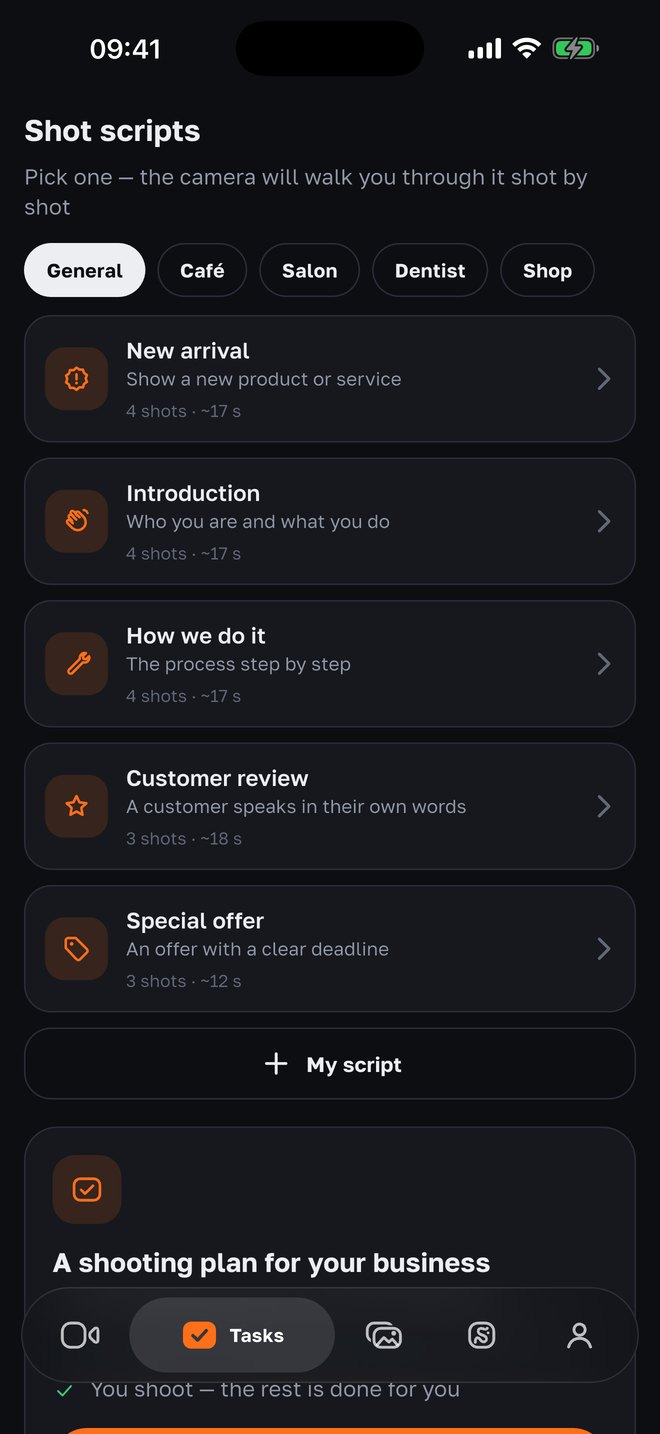
Don’t know what to shoot for Reels? Pick a shot list — “New arrival”, “Introduction”, “Drink of the day”, “Before and after” — and the camera walks you through the shots: what’s in frame, which line to say, how many seconds. At the end — one video out of all the shots.
- shot lists, teleprompter, timer and take check — free
- $0
- shot lists, teleprompter, timer and take check — free
- ready-made shot lists: 5 general plus café, salon, dental and shop
- 10
- ready-made shot lists: 5 general plus café, salon, dental and shop
- 3–10 seconds each: a 12–18-second video in one session
- 3–4 shots
- 3–10 seconds each: a 12–18-second video in one session
- shot lists: title, shots, lines and seconds — stored on the phone
- Your own
- shot lists: title, shots, lines and seconds — stored on the phone
How it works
01
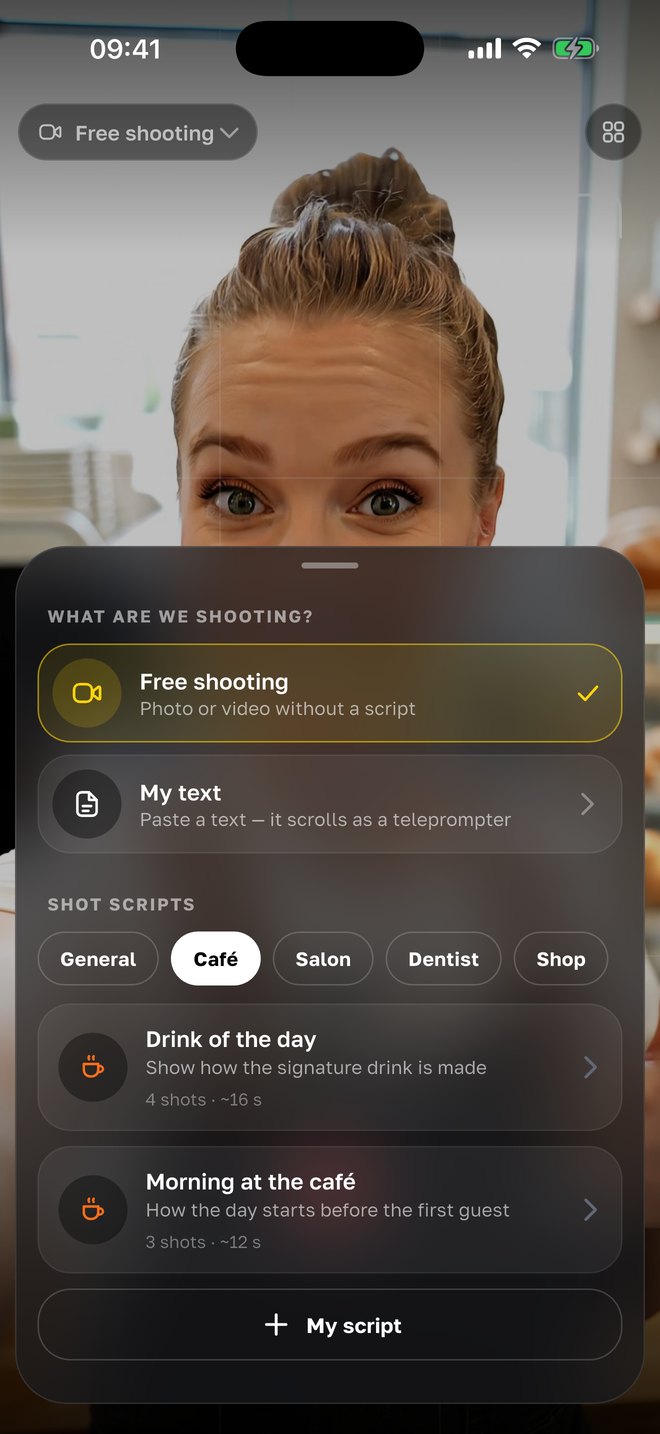
Pick a shot list for your business
In the camera tap “What are we shooting?”. The general lists fit everyone: “New arrival”, “Introduction”, “How we do it”, “Customer review”, “Special offer”. Then the niche ones: “Drink of the day” and “Morning at the café” for a coffee shop, “Meet the stylist” for a salon, “Nothing to fear” for a dental clinic, “New arrivals” for a shop. Each shows the number of shots and the rough length.
02
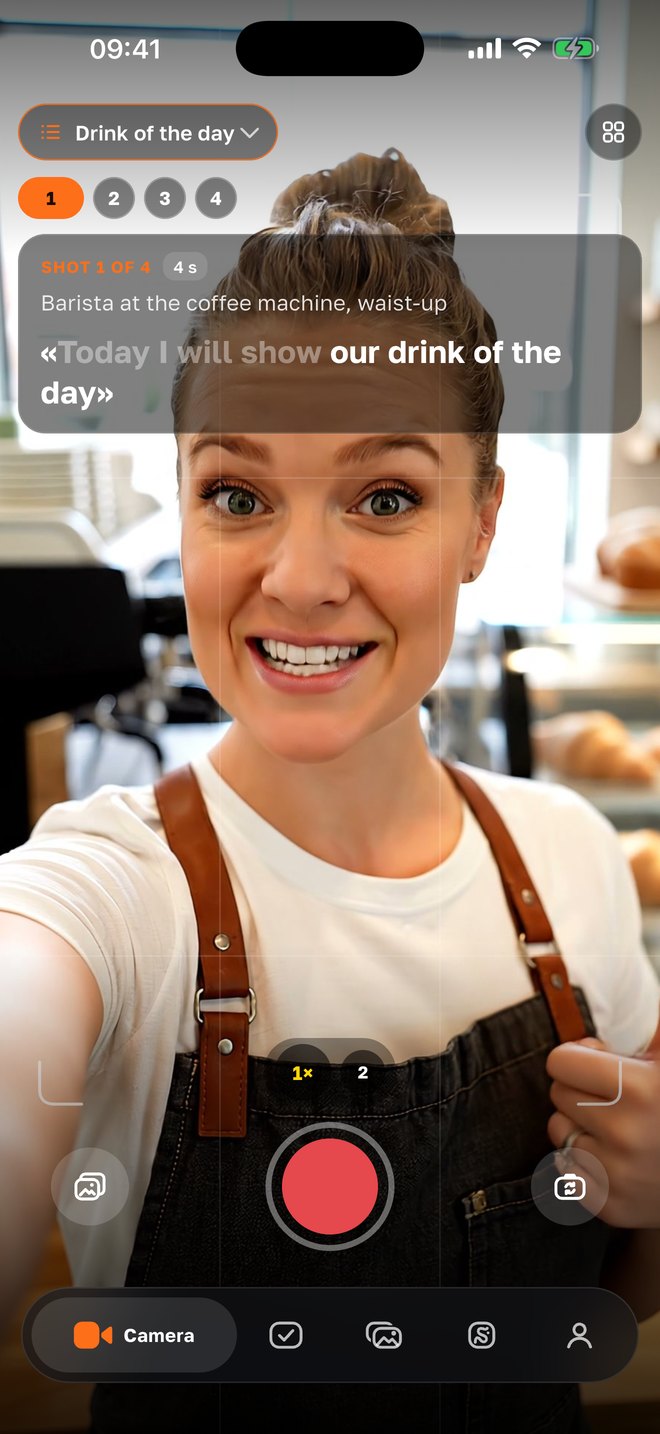
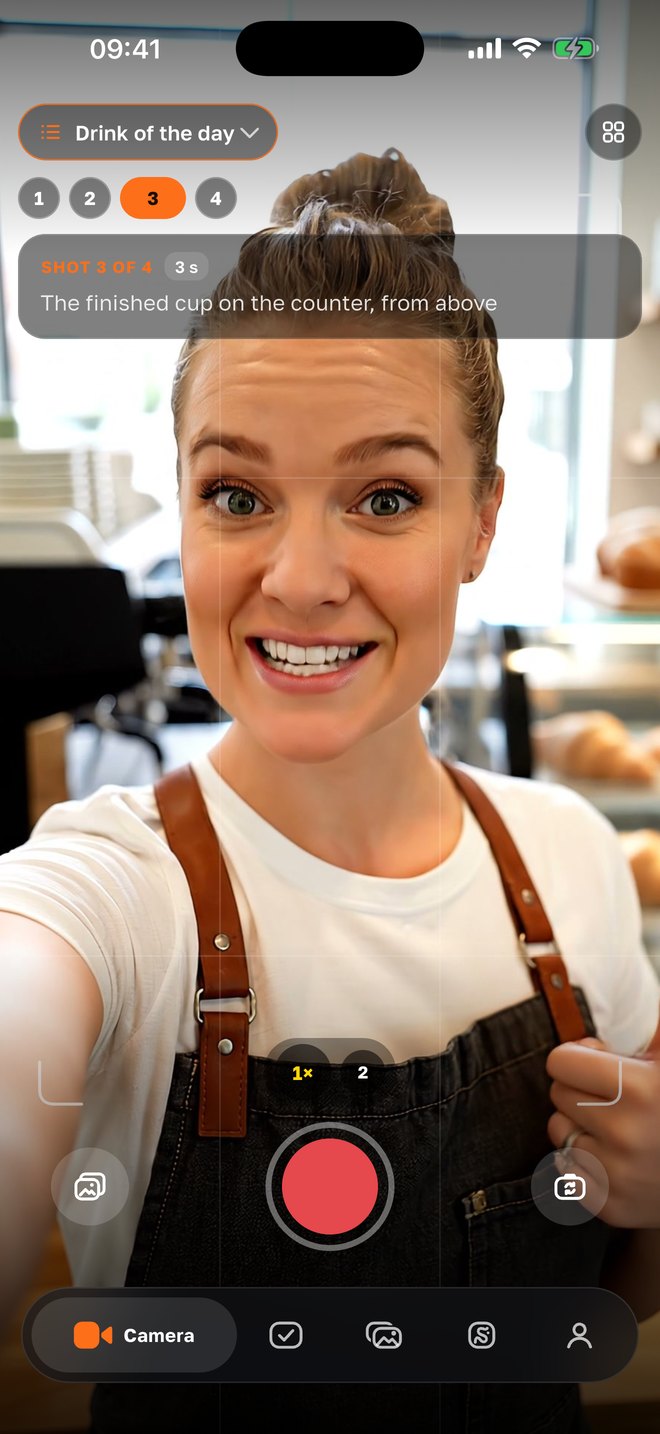
Film shot by shot
At the top — which shot this is, what should be in it and for how long: “Close-up: milk pouring into the cup, 5 s”. The timer counts 3-2-1 and stops the recording by itself. If the shot has a line, it is written out and runs on the teleprompter, following your voice. Each shot is checked right away: too quiet, too dark, face out of frame, line not finished — reshoot on the spot.
03
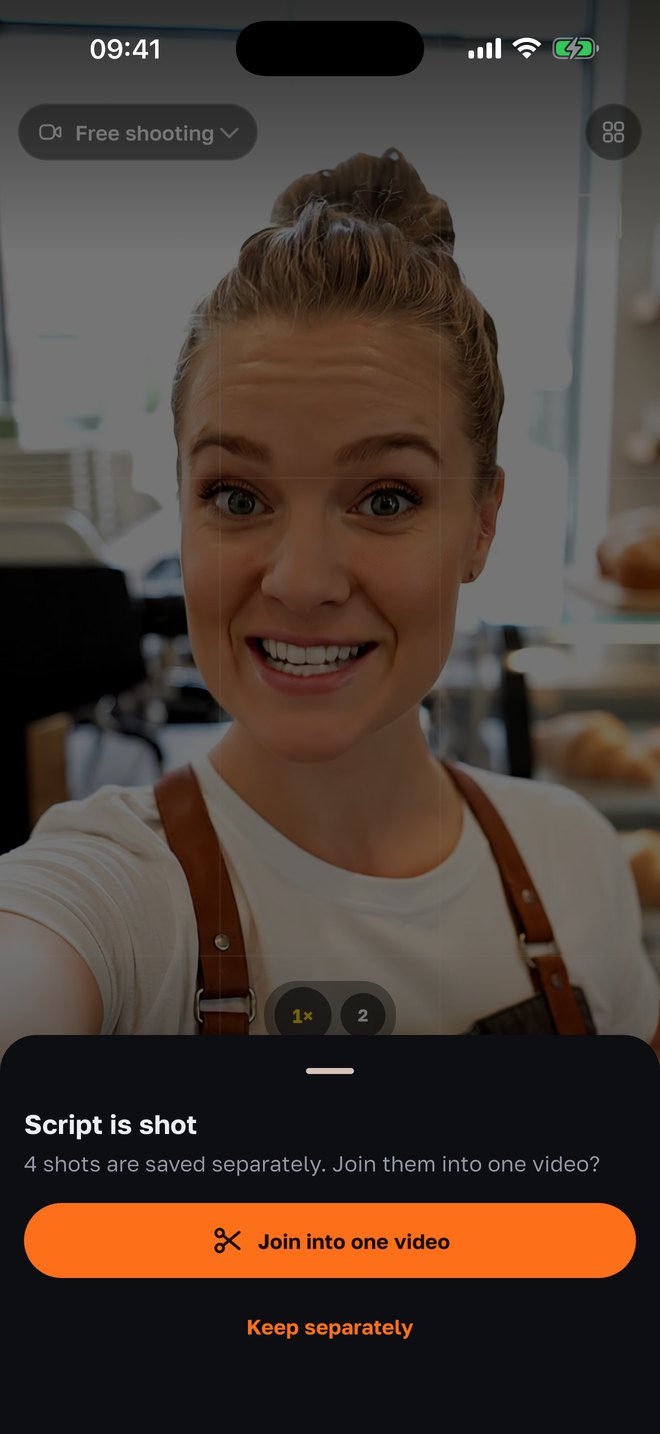
Join them into one video
When all the shots are done, each is already in Photos. The app offers to “Join into one video” right on the phone, in the order of the shot list. Then it’s like any take: captions, trim pauses, noise reduction — and the video is ready to post.
04
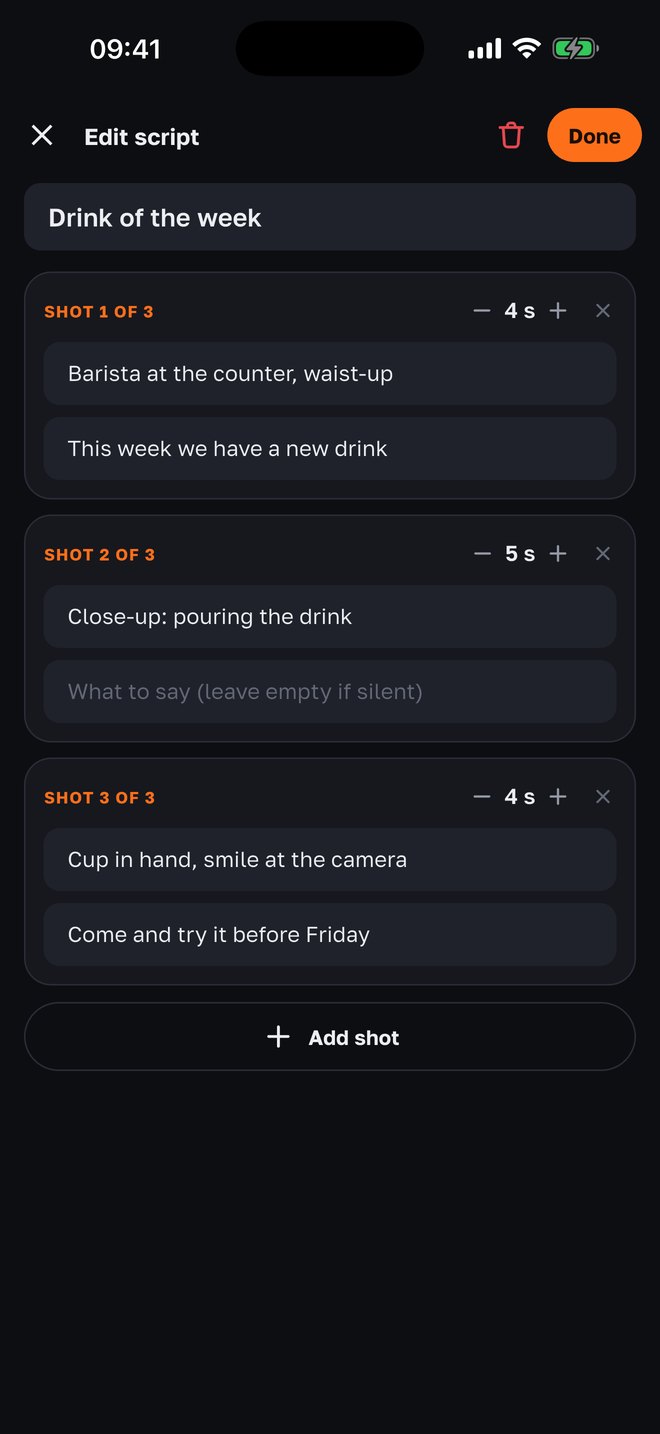
Write your own shot list
“My script”: a title and the shots — what to film, what to say (or nothing), how many seconds. It stays on the phone next to the ready-made ones; edit it and shoot it as many times as you like.
Why it is built this way
A blank page is the main reason people don’t film
A café owner knows their craft but not which shot to start with. A shot list removes the question: three or four clear shots, and the video exists.
Short shots instead of one long take
A video of 3–4 shots of 3–5 seconds feels more alive than a minute of a talking head. A change of frame every few seconds is what holds attention in the feed.
The line is written in advance
Shots with speech come with a ready line — “We have something new, let me show you”. No improvising: the line runs on the teleprompter, and the take check tells you if you didn’t finish it.
A check right after “stop”
Every shot is checked on the phone: sound, light, face in frame, the whole line. You see the problem on the spot, not in the evening when the light and the mood are gone.
A structure that works
The lists follow one pattern: a person in frame — a close-up of the craft or product — the result — a call to action. It’s a story the viewer gets in 15 seconds.
Your own lists are your template
Filming a “drink of the week” every Friday? Write the shot list once — and every week the camera walks you through the same shots. You get a series with a recognizable rhythm.
With your agency
Shot lists come from the weekly plan
If an agency runs your project through SMMCopilot, the “Tasks” tab shows shoots for specific posts of the week. For each one the AI writes a shot list: what to film, which words to say to the camera and for how many seconds — based on the brief and the idea of the post. The footage goes to the project; editing, voice-over, captions and publishing are on the agency.
- Shots for a specific post
- Not a generic list but one for this Reel or carousel from the plan: a post — one shot, a carousel — 2–10, a Reel — up to 6.
- Words to the camera
- Every shot with speech gets the exact line and how many seconds to say it; the line runs on the teleprompter.
- Filmed — edited
- Shots are attached to the post; “Build” starts the edit on the server from the plan’s idea. The result arrives for approval.
- One evening of filming
- The owner films from the list for 10–15 minutes; the rest is the agency and the AI.
Questions
- Is it free?
- Yes. Shot lists, the teleprompter, timer, take check and joining the shots are part of the free SMMCopilot camera — no account, no subscription.
- Which shot lists are there?
- Five general ones — “New arrival”, “Introduction”, “How we do it”, “Customer review”, “Special offer” — plus lists for a coffee shop, a beauty salon, a dental clinic and a shop. And your own, without limits.
- Can I film without a shot list?
- Yes — “Free shooting”: photo or video without prompts, with the same frame coach and take check.
- What if a shot didn’t work out?
- Reshoot it: after “stop” the take check tells you what’s wrong — too quiet, too dark, face out of frame, line not finished. The other shots stay.
- Where are the shots saved?
- Each shot goes to Photos and to “Shot in the app”. After the last shot the app offers to join them into one video on the phone; with an agency project — to edit it on the server right away.
- In which languages?
- English, Russian and Uzbek — the app language. The shot lines run on the teleprompter; in English and Russian it follows your voice, in Uzbek it scrolls at the speed you set.
- Is there an Android version?
- Not yet — iPhone first. Android is next.
Nearby in the app
Film your first video from a shot list today
Open the camera, pick a shot list — and in five minutes you have a finished video. Free, no account. With an agency — a shot list for every post of the week.