
With an agency · a plan on Monday, tasks with deadlines
What to film this week — the AI knows for you
The owner doesn’t have to invent content. On Monday morning the AI composes the week’s plan from the brief and what worked before, and sends tasks: what to film, by which day, for which post. Open a task — there is a shot list with lines and seconds. Filmed — “Build”.
- the week’s plan in project time: posts by day and shoot tasks
- Mon 09:00
- the week’s plan in project time: posts by day and shoot tasks
- each task’s deadline — the shooting day; a reminder on the due day after 11:00
- 20:00
- each task’s deadline — the shooting day; a reminder on the due day after 11:00
- shots per list: what is in frame, which words to say, how many seconds
- 1–6
- shots per list: what is in frame, which words to say, how many seconds
- of filming from the list per week — the rest is the AI and the agency
- 10–15 min
- of filming from the list per week — the rest is the AI and the agency
How it works
01
Monday: the plan and the tasks
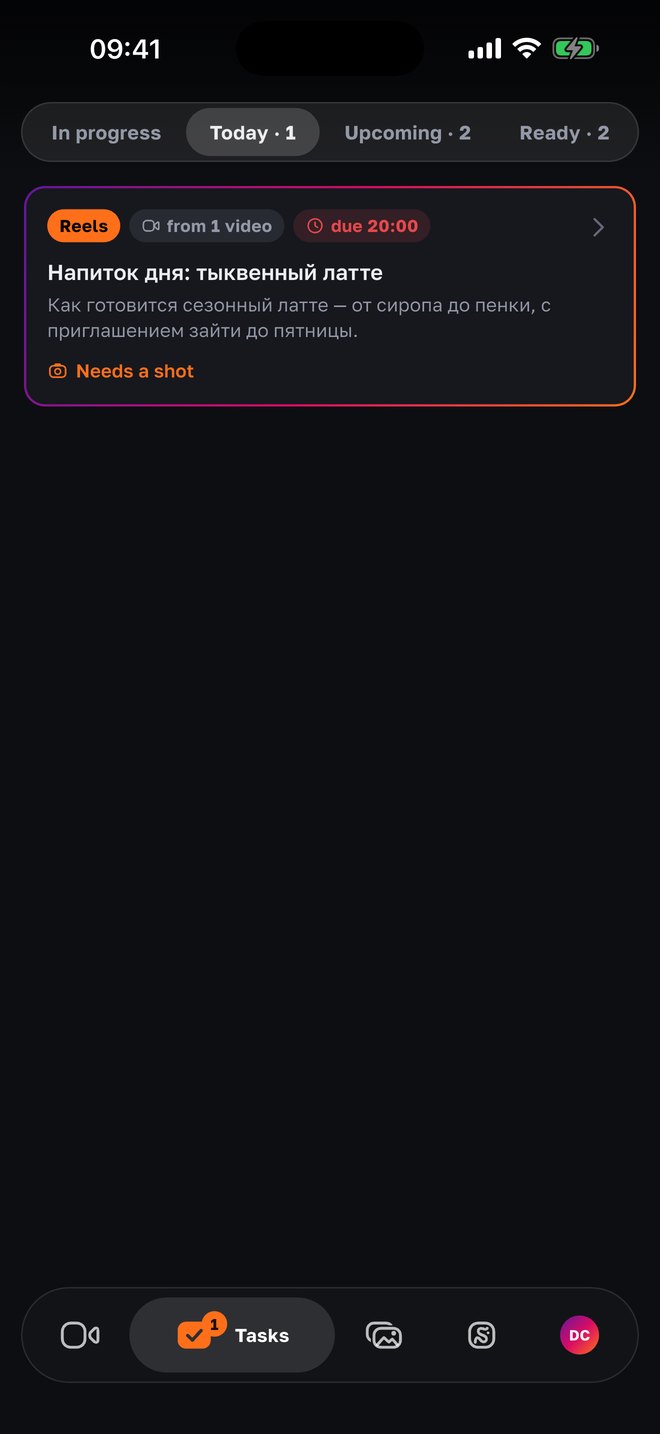
The AI looks at the brief, the quotas (how many Reels, posts and stories a week), the free materials, last week’s plan and what performed — and composes the week. The owner gets tasks in the bot and in the app: “shoot this by Wednesday”. In the “Tasks” tab they are sorted: “Today”, “Upcoming”, “In progress”, “Ready”.
02
Inside a task — numbered shots
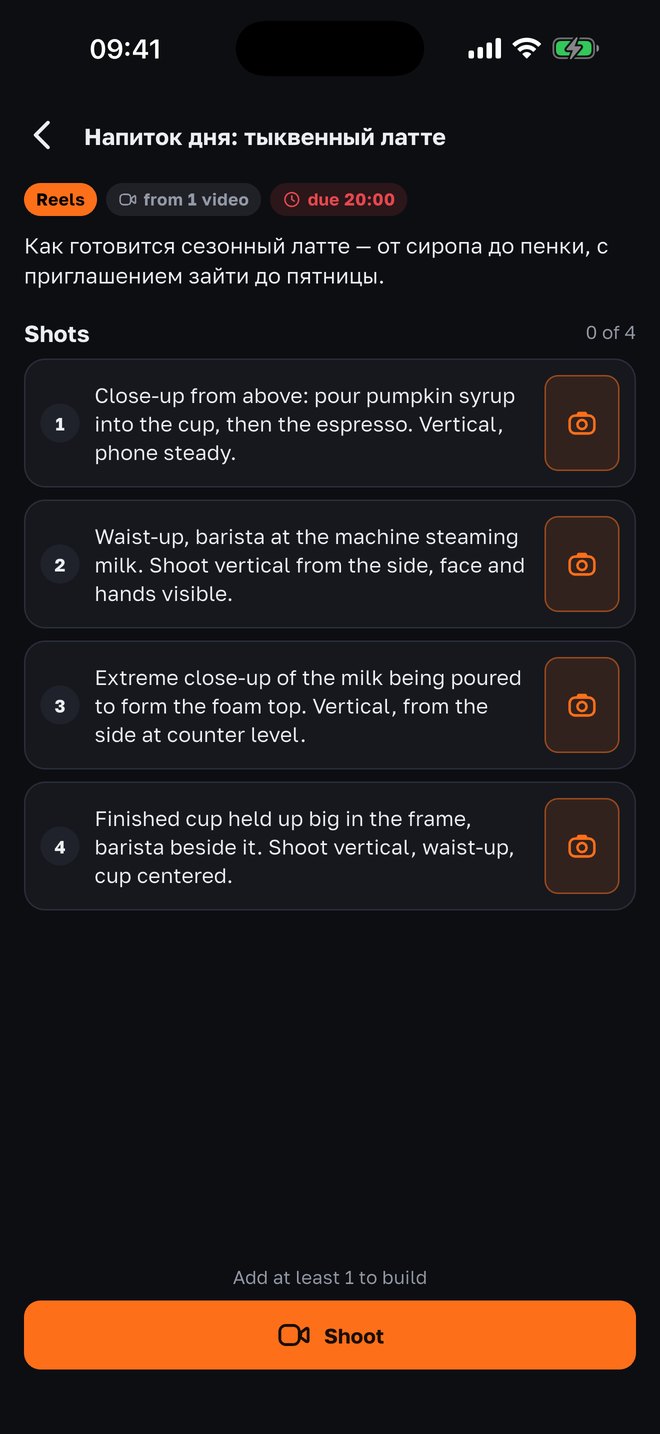
One task is one post. The idea on top: what it is about and why. Below — the shots: “Shot 1 — barista at the espresso machine, waist-up, 5 s: “Today I’ll show our seasonal latte””. A post — one shot, a carousel — two to ten, a Reel — up to six. The AI writes the list from the post type, the idea and the brief; it is prepared in advance while you scroll the tasks.
03
Film shot by shot — the camera guides
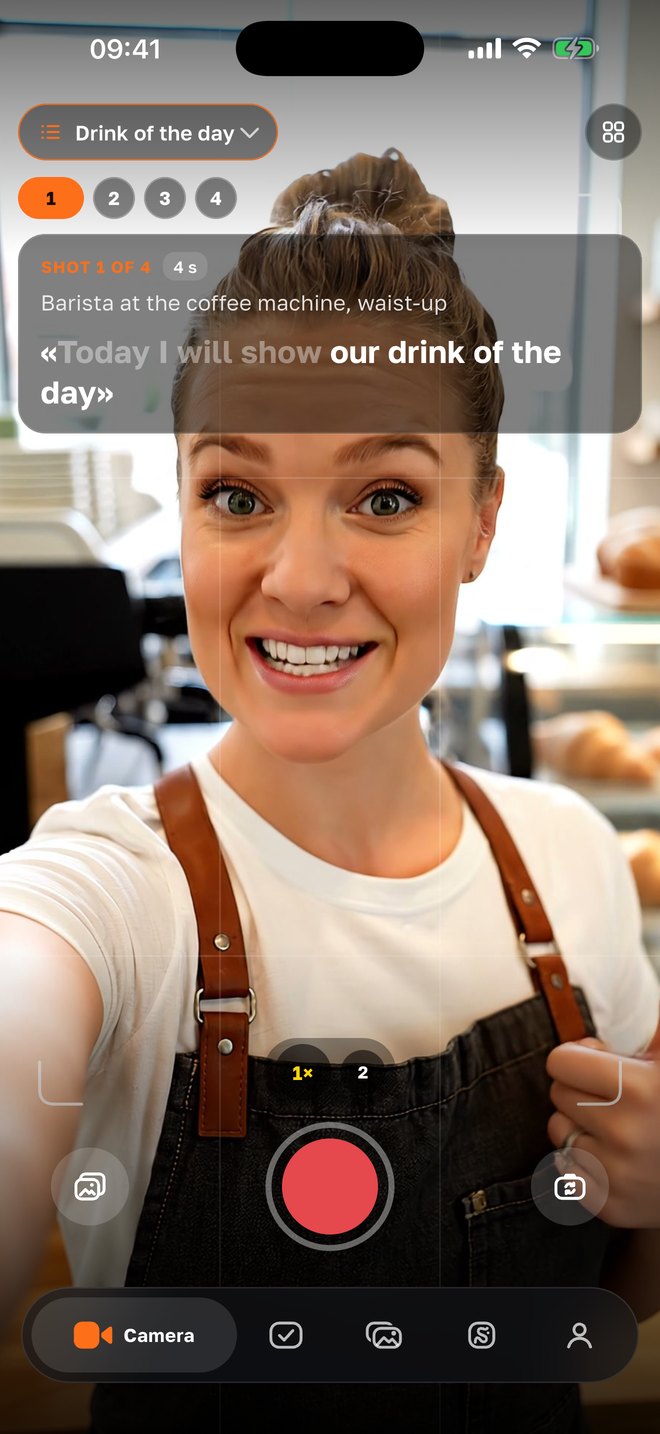
Tap a shot — the camera opens with it: what’s in it, the line on the teleprompter, a timer for the right seconds. The footage goes to the task in the background, the camera moves to the next empty shot. You can take a shot from the gallery or the project’s assets, retake or replace.
04
“Build” — and the result is right here
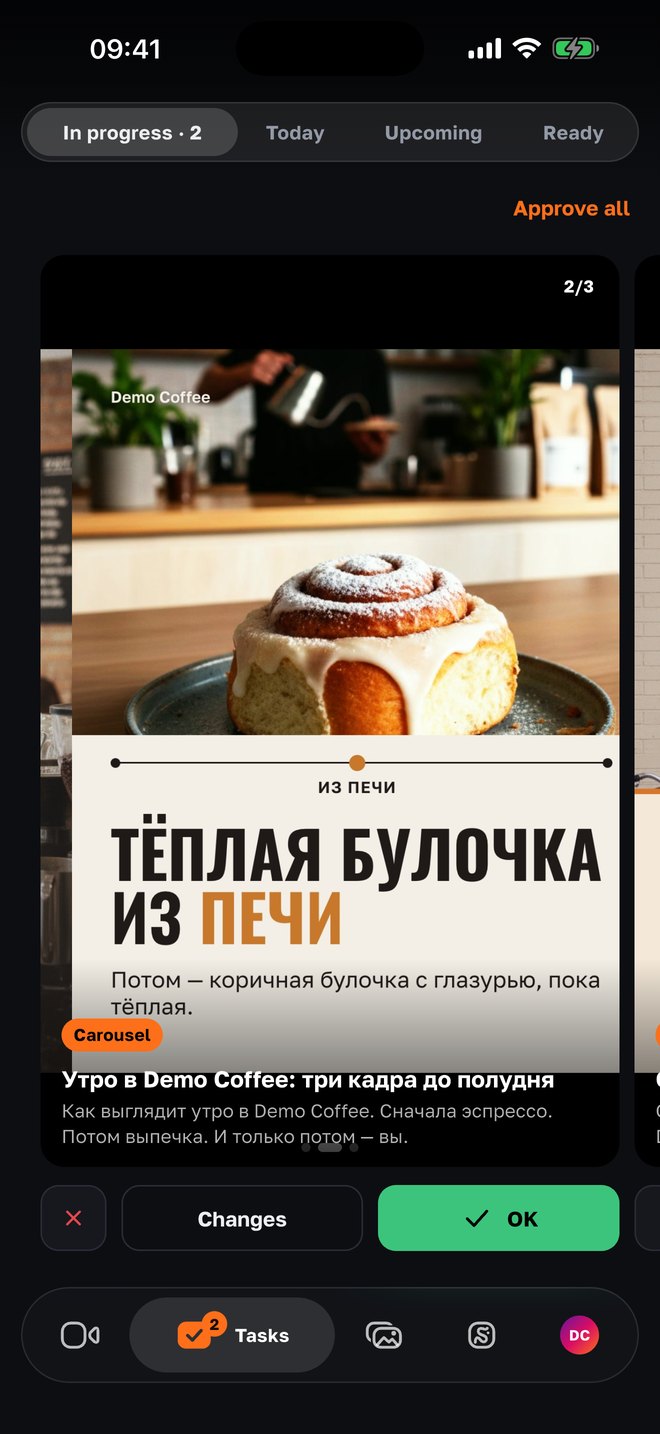
All required shots are in place — the “Build” button. The AI edits the post from the task’s idea: shot by shot, with your words, captions and titles. The result appears in the same task: approve, publish right away or download; not happy — replace the shots and build again.
Why it is built this way
A content plan is the work owners put off
They can film; they have no time to invent “what and why” for the week. The AI takes the planning: from the brief, the quotas and what worked in past weeks.
A task is a post, not “film something”
Every task has a specific post and an idea. That is why the shot list is precise: what to film, what to say, how long — and the result builds without guessing.
One shot — one post
A sent shot goes to one waiting post of each type, not to all at once. Five posts from one photo is a mistake we already made and fixed.
Not filmed — the AI doesn’t wait forever
A task more than two hours overdue or cancelled — the agent replaces the post with a Reel or a carousel from what already exists (two a week at most) and writes what and why.
The agent reminds, not a manager
On the due day after 11:00 — a short “to film today: …, 2 posts are waiting for it”. Can’t make it — “cancel task 2” or “postpone by two days”.
The camera is at hand
The camera opens right from the task’s shot — with the teleprompter, timer, frame coach and take check. No switching between apps and a messenger.
For agencies
The week’s plan is in the panel, the filming is with the owner
The agency sees the plan on the week board: posts by day, “shoot this” tasks as chips, who sent what. Recompose the plan, attach a material to a task, remind or cancel — from the panel; footage sent for a task goes to editing by itself, and the task closes when the shots are received.
- Quotas and the goal
- How many Reels, posts and stories a week — from the brief; the plan accounts for the project’s goal (leads, followers, reach) and the “what performed” summary — ~70 % proven, ~30 % new.
- A board by day
- Posts are dragged between days; scheduled ones move with their schedule. “Waiting for materials” — one line with a counter.
- Questions before a video
- Before a video on a topic the agent asks the owner 2–3 questions; the answer goes into the script as “the owner’s words”.
- The weekly report
- On Sunday — what went out, metrics, the best posts and “film next week” — to the owner in the bot and in the app.
Questions
- Who composes the plan?
- The AI — from the project brief, post quotas, free materials, last week’s plan, open tasks and the metrics review. The agency sees the plan in the panel and can recompose it.
- When do the tasks arrive?
- On Monday at 9 am project time — in Telegram and in the app. Each task’s deadline is the shooting day at 20:00; the agent reminds on the due day after 11:00.
- Where does the shot list come from?
- The AI writes it for the specific post: by type (a post — one shot, a carousel 2–10, a Reel up to six), title, idea and the plan’s task, with exact words to the camera and seconds. For a Reel, a shot with speech gets no fewer seconds than the line needs.
- What if I didn’t manage to film?
- Tell the agent “postpone by two days” or “cancel task 3”. A task more than two hours overdue the agent may replace with a post from existing materials — two a week at most — and will explain it in a message.
- Can I film off the list?
- Yes — any photo or video from “Assets” can go into a task’s shot, or give the agent a task from your selection. The list is a hint so the result builds right the first time.
- What happens after “Build”?
- The AI edits the post from the idea and the shots (about a minute for a Reel, two to three for an “own approach” carousel), and the result appears in the task. You can approve it, publish right away, download or rebuild with other shots.
- Is there an Android version?
- The app — iPhone only for now. Tasks and sending materials also work in the Telegram bot.
Nearby in the app
Let the week plan itself
A plan on Monday, tasks with shot lists, editing by button. Connect your project through an agency on SMMCopilot.